AI Listing Simulation: Test How Agents Pick Your Products

· By Xhurian Shaba, co-founder and CEO of ecentic

16 min read

AI listing simulation shows how ChatGPT, Claude and Gemini choose between your product and a rival's. Learn what to test, how to read results and what to fix.

00

Introduction

Product data moving through an agent comparison

Whether people google, go to Amazon or ask a chatbot, AI now gives them a response with a product in it, and most e-commerce brands have no idea how to be that product. AI listing simulation is the fix for that blind spot. You put an AI model in front of your product and a named competitor’s, ask it to choose, and read why it chose what it chose.

It works on the data an agent actually reads: your product feed, your catalog and the structured data on your product pages. It does not work on your homepage, which the agent never sees.

I think this is the most underrated test in e-commerce right now. Stores spend weeks arguing about hero banners while the thing deciding the sale is a title field that says “Blue Bottle 2”. A human would bounce. An agent just picks someone else and never tells you.

ecentic
ecentic.ai
See What Agents Choose
Compare your products with a named competitor across AI models, then see where your feed and product data may be losing.
Check my store free
01

TL;DR

TL;DR

  • AI listing simulation means asking AI models to choose between your product and a competitor’s, then reading the reasons they give.
  • The inputs are your product feed, catalog and structured data. Titles, descriptions, GTINs, price, availability, shipping and returns matter most.
  • Treat results as directional evidence. Even a strong academic simulator matched real add-to-cart shifts in 77% of cases, not all of them.
  • Fix the data, re-run the same comparison, then watch visits from AI assistants to see whether anything moved.
  • The free ecentic scan covers your top 10 products with no card, which is enough to see the pattern.
02

What AI listing simulation means for an online store

What AI listing simulation means for an online store

The phrase gets mixed up with real estate tools and description generators, so let me be specific. For a store, a listing is a product record: title, description, images, attributes, price, stock, shipping and return terms. Simulation means running a shopping request through an AI model and watching which record it selects.

A useful simulation has three parts:

  1. A shopper request, such as “best gift under $60 for someone who likes dark chocolate”.
  2. A set of candidate products, yours and at least one named competitor’s.
  3. A reason, in plain English, for the pick.

The reason is the valuable part. A score without a cause is a horoscope. When the agent says it preferred the other product because that listing stated the material, the size and the return window, you have a to-do list.

This is also different from classic A/B testing. An A/B test needs traffic and weeks. A simulation needs a catalog and a few minutes. Shopify’s engineering team has written about the same idea for its own agent work: its ShopGym sandboxes let developers reproduce agent failures under controlled, consistent conditions, which is exactly what you cannot get from live shoppers. If you want the longer argument for testing before shipping changes, we cover it in simulation-first A/B testing for AI agents.

03

How an AI agent reads your store

How an AI agent reads your store

The agent never sees your homepage. It reads machine-readable data, and the sources vary by platform.

On Shopify, catalog data is standardized so that apps and agents can search and display it. Shopify’s Summer '25 release described Shopify Catalog as standardizing pricing, options and availability for apps and AI agents. In practice that means a thin or inconsistent product record travels everywhere with you.

Shopping assistants also mix static product knowledge with live shopper behavior. Gorgias documents that its Shopping Assistant combines catalog information, product-page content and custom product details with shopper activity, such as viewed products and cart contents, to decide what to recommend. The static half is the part you control: descriptions, materials, warranty information.

Then there is checkout. Google’s UCP, the Universal Commerce Protocol, is an open standard for agent checkout. Google’s own developer material says UCP enables merchant discovery, catalog search and checkout through a profile at /.well-known/ucp. It pairs with AP2, a payments protocol where a merchant-signed checkout is verified against what the shopper authorized, so an agent cannot quietly change the price. Buying inside the AI answer is live today on Google AI Mode and Gemini in the US. ChatGPT sends shoppers to the store’s own checkout instead.

OpenAI has its own protocol, Google has UCP, and Amazon has a wall. Your catalog has to speak to all of them, or at least not break in front of them.

If you want to see how these agents are built from the inside, a walkthrough on how to build an AI agent makes the retrieve, reason and act loop easier to picture. It also explains why a missing field is invisible to the model: what is not in the data does not exist for it.

04

What to check in a simulation

What to check in a simulation

Before you run anything, know which fields the agent can lean on. Google’s Merchant Center documentation lists the supported attributes, and the ones that decide most comparisons are title, description, image, brand, SKU, GTIN, price, price currency, availability, and structured shipping and return details. You can read the full list in Google’s structured data attribute reference.

Here is how I would read each one when the agent picks a rival:

Field What the agent does with it Typical failure
Title First thing matched to the shopper’s request Brand name only, no product type, size or use
Description Source of reasons it can state back Marketing copy with no concrete attributes
GTIN, brand, SKU Confirms the product is a known, specific item Missing or duplicated identifiers
Price and currency Basic comparison and checkout Price in the feed differs from the page
Availability Whether it is safe to recommend Stale stock status
Shipping and returns Whether a purchase can complete Fields absent or inconsistent

The boring failures win. In our own audits, a spirits marketplace doing about €70M a year had a fault in the data agents read on 88% of its 9,699 products. When agents were asked where to buy two bottles it stocks, it came up 0 times in 20. Nobody on that team had decided to be invisible. The feed just said so.

The checkout side fails quietly too. A Swedish skincare brand’s agent checkouts reached payment in 0 of 6 countries because a shipping setting asked for a phone number. Agents do not have your customer’s phone number, which is a reasonable thing for them not to have. Neither store is named here, and I will keep it that way.

05

How to run a simulation on your own catalog

How to run a simulation on your own catalog

You can do a rough version by hand, and you should if you have never done it. Pick one product and one real competitor, then follow these steps.

  • Write the shopper request the way a person would type it into a chat, with a budget, a use and a constraint.
  • Paste your product record and the competitor’s into the same prompt, stripped of branding where you can, and ask the model to choose and explain.
  • Repeat with at least two different models. They disagree more than you would expect.
  • Save the stated reasons and group them: missing attribute, weaker claim, price, shipping, trust.
  • Change one thing in your listing, run the identical prompt again and note whether the pick flips.

That last step is the point. Change one thing at a time, or you learn nothing.

Doing this by hand for one product is an afternoon. Doing it for 800 products is a career change. That is why we built ecentic around it: it connects to Shopify, WooCommerce or a product feed, has ChatGPT, Claude and Gemini compare each product with a named competitor’s, and shows why it loses. If you want a tour of the tool category, our write-up of AI agent simulators for testing product page visibility compares the approaches, and you can try the UCP Playground to test agents against a store directly.

If you are a developer-minded team, you can also test the pipeline side. Stripe documents a sandbox where platforms upload product catalog data and validate parsing, field mappings and data quality before enabling live updates. The idea carries over: validate the data before agents see the live version.

06

Reading the results without fooling yourself

Reading the results without fooling yourself

A simulation is a model of a model. It can be wrong in two ways: the simulated shopper is not a real shopper, and the AI you test is not the AI your customer will use next month. So how much should you trust it?

Reading the results without fooling yourself

There is useful academic evidence here. The SimGym paper simulates A/B tests on e-commerce storefronts with vision-language agents in a live browser, and it reported 77% directional alignment with observed add-to-cart shifts. The authors compare simulated and observed shifts using directional alignment and Pearson correlation. Read that number the honest way: simulation usually points the right way, and sometimes it does not. It is a good filter for what to try first, and a poor stand-in for a live result.

Here is how I separate findings from guesses:

  • Reasons that repeat. If three models cite the same missing attribute, fix it. That is a finding.
  • Differences between models. In our simulations, ChatGPT picked the product about 3x as often as Claude or Gemini on the same catalog (51.6% vs about 18.5%), across the 36,797 simulated purchases we had run by October 2026. Same products, very different habits. So do not average the models into one score. Read each separately.
  • Single odd picks. One run that favors a rival for a strange reason is noise until it repeats.
  • Predictions about revenue. Simulation does not tell you what you will sell. Anyone who says it does is selling something, and I am selling something too, so I am telling you now.

Fair caveat: simulation cannot replace real traffic data. It tells you what to fix first and why. Only your own visits, carts and orders tell you whether it worked.

07

Turning findings into fixes you can measure

Turning findings into fixes you can measure

Most fixes are dull and specific. Add the missing GTIN. Put product type, size and material in the title. Replace a mood-board description with one that states what the thing is, who it suits and what the return window is. Make the structured data match the visible page. Fill the shipping and returns fields so a purchase can finish.
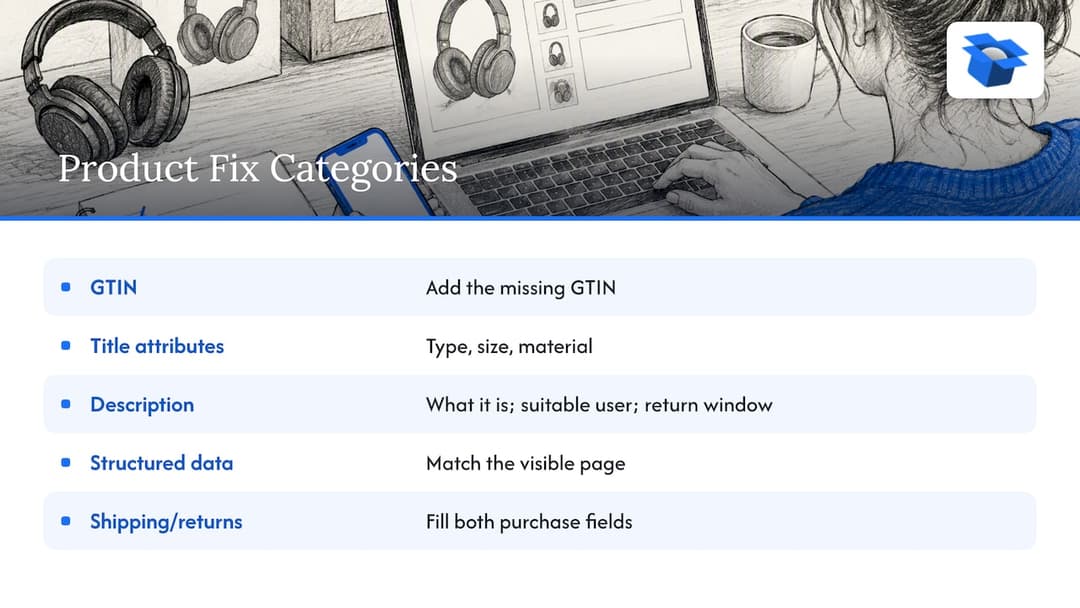
Five product listing fields to improve

Then measure in two layers.

First, re-run the same comparison. If the agent now picks you and cites the attribute you added, the fix landed. This is cheap and fast, and it is where simulation earns its keep.

Second, watch real behavior. Visits from AI assistants are the earliest signal you can see in analytics. Our first pilot, DUA Flavours, saw visits from AI assistants and direct traffic rise 12% from April to July 2026. That is a visits number, not sales, and one pilot is one pilot. But it is the kind of movement you can actually watch for, and our AI agent traffic playbook shows how to set the tracking up. For the listing work itself, see our guide to product listing optimization for AI picks.

On Shopify, ecentic pushes fixes into Google Merchant Center and tracks visits from AI assistants. On WooCommerce, the free ecentic plugin lets agents search, fill a cart and check out through UCP. The checkout part is what plain feed tools skip, and it is where our Swedish example lost every sale.

A note on competitors, since you will compare tools. Plenty of feed management products are good at what they do: cleaning, mapping and syndicating a catalog to many channels. If your main problem is getting one feed into twenty marketplaces, they fit you well. They generally stop at the feed. Our comparison, best AI shopping agent optimization tools, sets out who fits whom.

08

Our perspective

Our perspective

I think most brands treat AI shopping as a ranking problem, and it is closer to an interview. The agent asks your product record a set of questions, and a record that cannot answer loses to one that can. The loser rarely finds out.

That is why we simulate head to head. A score for your store alone is flattering and useless. A named competitor’s product next to yours, with the agent explaining its choice, is uncomfortable and useful. We have run 36,797 simulated purchases on that principle, and the reasons are almost never exotic. They are missing fields, vague titles and checkout settings nobody tested.

We also think finding the problem is half the job. So when you click Apply, ecentic rewrites the title, description and structured data and publishes them to the store. On the buying side, we want the agent to finish the order, not just admire the product. I would rather help a store sell one more order through an agent than write it another report.

Where this goes, I am not entirely cheerful about. Shoppers will delegate more, and the agent will pick from whatever data is easiest to read. Stores that do not tidy that data will be competing against stores that did, without ever meeting the shopper. That is a bleak sentence, and also a fixable one.

Xhurian Shaba

09

Start with the free scan

Start with the free scan

Our tagline is simple: get the sale when AI does the shopping. The fastest way to see what that means for your store is the free scan. It covers your top 10 products, needs no card, and shows you which competitor product the agents prefer and why.

If the pattern is real, the paid plans are listed on our pricing page. Compete is $14.90 per month for up to 100 products. Scale is $44.90 per month for up to 1,000 products with one-click fixes. Dominate is $149 per month and adds Google Merchant Center sync and agent checkout setup. There is also pay-as-you-go at 3% of AI-attributed orders, capped at $500 per month. Enterprise has custom limits, API and MCP access and a DPA, with no published price.

ecentic

Shopify merchants can start on the AI for Shopify stores page, and the AI product listing optimization page shows what Apply changes in a record.

10

FAQ

FAQ

What is AI listing simulation in e-commerce?

It is a test where AI models are asked to choose between your product and a named competitor’s, using the data agents really read. You get a pick and a stated reason. The reasons tell you which fields, claims or checkout settings to fix.

Which fields matter most in a simulation?

Title, description, image, brand, SKU, GTIN, price, currency, availability, and structured shipping and return details. Google lists these among its supported product attributes. Start with the title and description, because they supply the reasons an agent can repeat back.

How accurate are simulation results?

Treat them as directional. In one academic study, simulated storefront tests matched the direction of observed add-to-cart shifts 77% of the time. That makes simulation a good way to choose what to try first, and a weak way to forecast sales.

Does it work for both Shopify and WooCommerce?

Yes. ecentic connects to Shopify, WooCommerce or a plain product feed. On Shopify, fixes also go into Google Merchant Center. On WooCommerce, the free plugin lets agents search, fill a cart and check out through UCP.

Can I test this without paying?

Yes. The free scan covers your top 10 products and needs no card. It is enough to see whether agents prefer a competitor and what reasons they give.

Guides and research on winning AI shopping agents.