
ecenticecentic
How it worksResourcesPricingBlog
Install now
ASCII-art illustration of a stack of books

ChatGPT Product Recommendations: A 30-90 Day Playbook

Published: August 17, 2026 · 14 min read

Discover how to enhance ChatGPT product recommendations in just 30-90 days with actionable steps that drive measurable results.

00

Key Takeaways

Decorative illustrated blog title card for AI ecommerce optimization

The fastest way to get products recommended by ChatGPT is to give it clean, current, structured data it can retrieve and trust: a connected product feed, complete Product and Offer schema, visible review counts, and a page it can actually crawl. Do these six things, in this order, and most stores see measurable movement within a quarter.

Start here, in priority order:

  1. Connect a product feed through the ChatGPT Merchant Program or verify your Shopify Catalog link (week one).
  2. Complete Offer-level schema: price, currency, availability, SKU (week one to two).
  3. Add or expose AggregateRating and Review schema so third-party proof is machine-readable (weeks two to four).
  4. Fix crawlability: robots directives, canonical tags, and sitemap freshness (weeks two to four).
  5. Set an update cadence so price and stock never go stale (ongoing from month one).
  6. Tag traffic, measure agent-driven visits, and iterate on the SKUs that underperform (month two to three).

With ChatGPT reporting roughly 900 million weekly active users, the cost of missing this checklist is no longer trivial. Merchants who treat it as a data hygiene problem, not a marketing campaign, get the fastest results.

Key Takeaways

Getting recommended by ChatGPT depends on clean structured data, verified feed connections, visible review signals, and consistent measurement, not on marketing copy alone.

Point Details
Connect your feed first Verify Shopify Catalog integration or submit a feed through the Merchant Program before anything else.
Complete Offer schema Populate price, currency, availability, and priceValidUntil on every product page.
Expose review data Add AggregateRating schema and syndicate reviews to third-party platforms shoppers trust.
Keep data fresh Update feeds daily for fast-moving inventory, weekly at minimum for everything else.
Measure before scaling Tag agent-driven traffic and test changes in a tool like Ecentic’s UCP Playground before rolling them out storewide.

Primary Sources and Further Reading

  • Powering product discovery in ChatGPT: OpenAI’s overview of ACP and partner integrations.
  • Shopping with ChatGPT Search: Official help center on ranking signals.
  • ChatGPT Product Recommendations guide: Practical feed and schema checklist.
  • Why optimize for ChatGPT: External perspective on visibility strategy.
01

How Does ChatGPT Choose Which Products to Recommend?

How Does ChatGPT Choose Which Products to Recommend?

ChatGPT ranks products the way a search engine ranks pages, but the inputs are different. OpenAI’s Help Center confirms that product results are selected using structured metadata like price, description, and availability pulled from first-party and third-party sources. Query relevance, schema completeness, live pricing, review volume, and conversation context all factor in, but not equally.

Availability and price act as hard filters first. A product that’s out of stock or missing currency data gets excluded before ranking even starts, no matter how well-written the description is. Once a product clears those filters, softer signals decide the order: how well the title matches the shopper’s intent, how many reviews back the claim, whether the offer includes shipping or return clarity.

Three quick examples show how this plays out:

  • A shopper asking for “waterproof hiking boots under $120” needs price and a spec match. Products missing priceCurrency in schema often get skipped even if they’re in budget.
  • A specs-heavy query like “GPU with at least 12GB VRAM” rewards structured attribute data over marketing copy.
  • A persona-based ask, like “gift for a runner training for a first marathon,” rewards products with FAQ content and use-case language that a large language model can pattern-match.

Yotpo’s breakdown of the recommendation pipeline describes a retrieval stage that pulls live data before the model reasons about it, similar to the retrieval-augmented generation techniques described in academic work on retrieval-integrated models.

The model isn’t just picking a product it remembers from training. It’s retrieving current listings, checking them against the shopper’s stated constraints, and then explaining why one wins. That explanation step is where clean data pays off.

02

What Should Go in a ChatGPT Merchant Program Feed?

What Should Go in a ChatGPT Merchant Program Feed?

You have two paths into ChatGPT’s product index: a submitted feed through the Merchant Program, or general web crawling of your site. OpenAI’s own materials on powering product discovery in ChatGPT describe the Agentic Commerce Protocol (ACP) as the mechanism that lets merchants share feeds directly, which produces more accurate, more current results than crawling alone. If your product data changes often, submit a feed. Don’t rely on a crawler to notice a price drop.

A usable feed needs these fields at minimum:

  • SKU or GTIN
  • Canonical product URL
  • Title and description
  • Price and priceCurrency
  • Availability status (InStock, OutOfStock, PreOrder)
  • Image URLs (primary plus at least one lifestyle shot)
  • Variant data (size, color, material)
  • Shipping and return policy pointers

Most rejections and stale listings trace back to a handful of mistakes:

  1. Missing or inconsistent currency codes across variants.
  2. Feed timestamps that lag actual inventory by days, not hours.
  3. Duplicate SKUs pointing to different canonical URLs.
  4. Descriptions copied verbatim across near-identical variants, which confuses matching.

HubSpot’s guidance on ChatGPT recommendations recommends refreshing feeds at least daily for fast-moving inventory. Weekly is the floor for anything else.

03

Which Schema Fields Actually Affect Crawlability?

Which Schema Fields Actually Affect Crawlability?

Four Schema.org types do most of the work: Product, Offer, AggregateRating, and FAQPage. Get these right and you’ve covered both the eligibility filters and most of the ranking signals ChatGPT weighs.

A minimal Offer block should populate price, priceCurrency, availability (using schema.org’s InStock or OutOfStock values, not custom strings), url, and priceValidUntil. Skipping priceValidUntil is a common miss that leaves crawlers uncertain whether your price is still live.

Beyond schema, crawlability is a checklist of its own:

  • Confirm robots.txt doesn’t block product or category pages.
  • Use canonical tags consistently, especially across variant URLs.
  • Update your XML sitemap every time you add or retire a SKU.
  • Link new products internally from category and collection pages within a click or two.
  • Watch page response times. Slow pages get crawled less frequently.

Pro Tip: Run your top 20 product pages through a structured data validator monthly. Schema errors creep in silently after theme updates or app installs, and nobody notices until traffic drops.

Tools built for AI product listing optimization can flag these gaps automatically instead of waiting for a manual audit.

04

Writing Product Copy an AI Shopper Can Understand

Writing Product Copy an AI Shopper Can Understand

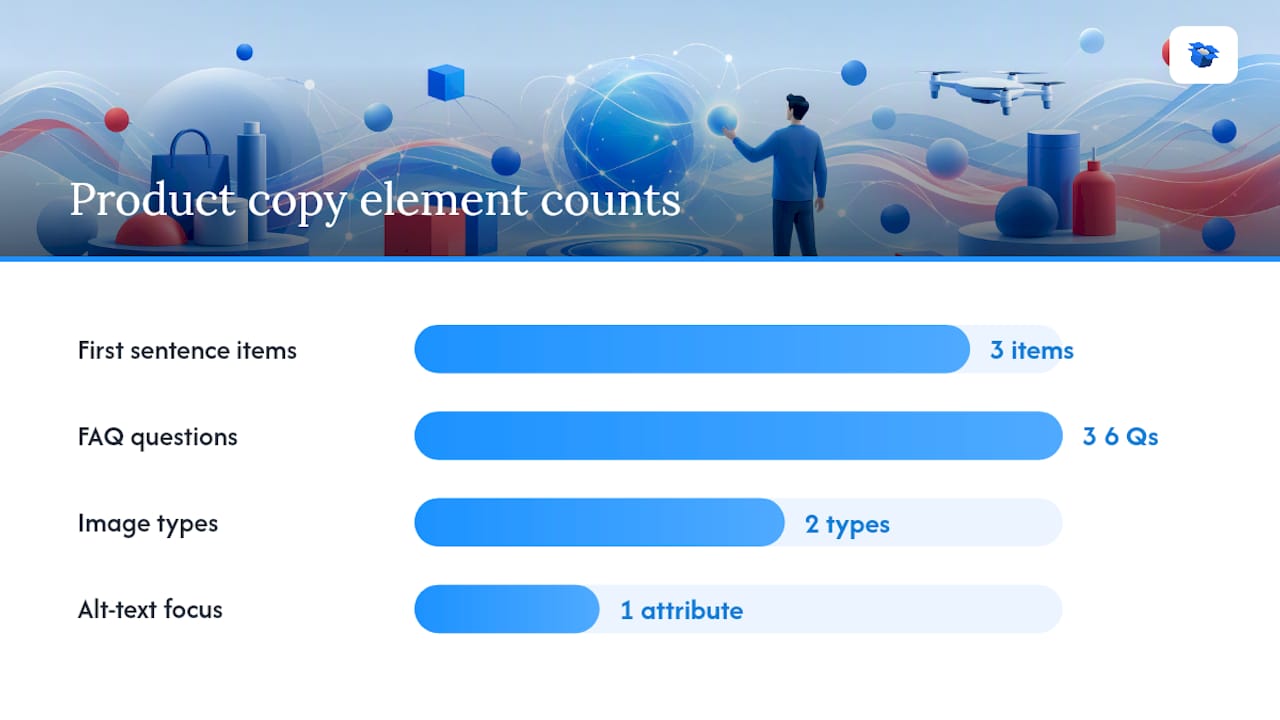
Writing Product Copy an AI Shopper Can Understand — overview diagram

Titles and descriptions need to work like structured data, even in plain prose. Lead with the attribute a shopper searches for, not brand flourish: “12-Ounce Ceramic Travel Mug, Leak-Proof Lid” beats “Our Best-Selling Mug” every time, because the first version answers a constraint-based query directly.

A few patterns consistently help:

  1. State use case, size or spec, and differentiator in the first sentence of the description.
  2. Add an FAQ block answering the three or four questions shoppers actually ask (fit, compatibility, care instructions).
  3. Write alt text that names the product’s key attribute, not just “product photo.”

Images matter more than most merchants assume. A primary image on white background handles basic matching, but a lifestyle or in-context image gives the model something to reference when a shopper asks “does this work for small kitchens?” or similar contextual questions. OpenAI’s shopping research feature explicitly supports visual, side-by-side comparisons, so incomplete image sets put you at a disadvantage against competitors who filled theirs out.

05

Why Third-Party Reviews Influence AI Recommendations

Why Third-Party Reviews Influence AI Recommendations

ChatGPT doesn’t just read your product page. It weighs external proof, and AggregateRating schema is how that proof becomes machine-readable. HubSpot’s research names review presence as one of the primary levers for improving recommendation odds, right alongside schema completeness.

Hands holding stylus over blank tablet with review labels

Priority sources differ by category. B2C merchants should prioritize marketplace reviews (Amazon, Google Shopping listings) and mainstream retail sites where relevant. B2B and software sellers should prioritize platforms like G2 and Capterra, where structured ratings are already standardized.

A few tactics move the needle:

  • Expose your review count and average rating in schema on every product page, not just the homepage.
  • Syndicate reviews to third-party platforms rather than keeping them siloed on-site.
  • Publish case studies with quantifiable outcomes; these get picked up as supporting evidence.
  • Respond publicly to reviews, since fresh activity signals an active, trustworthy listing.

Review coverage is a ranking input, not a vanity metric. The Search Engine Land study on live search signals found that a large share of ChatGPT’s product recommendations shift once live web signals, including third-party content, are factored in. Static, review-free listings lose ground fast.

06

Do Shopify and WooCommerce Stores Need Separate Setup?

Do Shopify and WooCommerce Stores Need Separate Setup?

If you run Shopify, check your Catalog integration first. OpenAI’s merchant materials confirm that Shopify Catalog already connects many stores’ product data to ChatGPT without extra configuration, though you should still verify the connection is active and pulling current inventory. WooCommerce stores typically need a feed submitted manually or through a connector app.

Marketplaces can serve as a secondary feed path, but direct feeds give you more control over pricing and availability accuracy.

Instant Checkout is worth watching closely: merchant-owned checkout keeps you in control of the customer relationship, while in-chat checkout options may win on convenience and could affect offer ranking. Pro Tip: Don’t assume your platform’s default settings are optimized. Log into your merchant dashboard and confirm Catalog sync status before assuming feed issues sit elsewhere.

07

How Do You Measure ChatGPT-Driven Traffic and Sales?

How Do You Measure ChatGPT-Driven Traffic and Sales?

Attribution starts with tagging. Add UTM parameters to any trackable link, log server-to-server events where possible, and, if you’re testing agent-specific integrations, tag Universal Commerce Protocol (UCP) queries separately from organic search traffic.

Track a compact set of KPIs rather than drowning in dashboards:

KPI What it tells you
Citation rate How often your SKUs appear in ChatGPT’s recommendation set for relevant queries
AI share of voice Your visibility relative to competitors on the same query set
CTR from agent visits Whether the recommendation is compelling enough to click
Conversion rate Whether the landing experience closes the sale
Revenue per session The bottom-line value of agent-driven traffic

Before pushing feed or schema changes live, testing them in a simulation environment like the UCP Playground shows how an AI shopping agent would actually retrieve and rank your listing, which cuts down on blind trial and error. For a deeper measurement setup, see how to track AI shopping traffic.

08

Why Isn’t My Product Showing Up in ChatGPT?

Why Isn’t My Product Showing Up in ChatGPT?

Start with the boring checks, because they catch most problems. Confirm the page is crawlable, validate your feed for schema errors, and check for price or availability mismatches between your feed and live site.

The fastest fixes to try, in order:

  1. Correct any missing or mismatched price and availability fields.
  2. Force a feed refresh if your last update is more than a few days old.
  3. Add AggregateRating schema if it’s missing entirely.

If none of that resolves it, request merchant support and bring diagnostic logs (feed validation errors, timestamps, screenshots of the schema output) so support can move faster than a generic ticket allows.

What We’ve Seen Actually Move the Needle

Offer schema and price parity fix more visibility problems than any content rewrite. Prioritizing your top 50 SKUs beats trying to optimize your entire catalog at once. External reviews on marketplaces consistently outperform on-site testimonials for AI trust signals. What wastes time early: obsessing over keyword density in descriptions before your feed and schema are even clean.

09

Test Your Store Before You Change It Live

Test Your Store Before You Change It Live

Guessing which fix will move your ChatGPT visibility wastes weeks you don’t have. Ecentic simulates how ChatGPT, Gemini, Claude, and Perplexity actually evaluate your product pages, showing exactly which SKUs get recommended, which get skipped, and why, before you touch a single line of code.

Ecentic

Connect your Shopify or WooCommerce store and get a free scan that flags missing schema, weak offer data, and review gaps SKU by SKU, then get plain-English rewrite suggestions you can publish in one click. Most merchants see their diagnostic results within minutes, not weeks. Start with a free product listing scan and see where your catalog actually stands.

10

Sources

Sources

  • Powering product discovery in ChatGPT | OpenAI
  • Shopping with ChatGPT Search | OpenAI Help Center
  • ChatGPT Product Recommendations: How to Make Sure You Are One
  • How ChatGPT Recommends Products | Yotpo
11

FAQ

FAQ

How do I get ChatGPT to recommend my product?

Connect a product feed through the Merchant Program or Shopify Catalog, complete Product and Offer schema, add AggregateRating data, and keep price and availability current.

Which AI is best for product recommendations?

ChatGPT currently leads on conversational shopping research and comparison features, but Gemini, Claude, and Perplexity also surface product recommendations, so optimizing structured data helps across all four.

What products are available in ChatGPT?

Any merchant with a connected feed, whether through Shopify Catalog or a direct Merchant Program submission, can appear, spanning categories from apparel to electronics to home goods.

What are the top AI products for shopping optimization?

Feed and schema optimization platforms, review syndication tools, and simulation tools like Ecentic’s UCP Playground each address a different piece of the discovery puzzle, and most merchants need at least two of the three.

How often should I update my product feed?

Daily for inventory that changes often, weekly at the absolute minimum for stable catalogs, since stale price or availability data gets filtered out before ranking even happens.

chatgpt shopping simulationchatgpt ecommerce recommendationschatgpt product discoveryrecommendations from AI toolsbest products using AIAI product suggestionshow to use ChatGPT for shoppingChatGPT shopping advicenatural language product guideschatgpt product recommendations
Back to blogGet started

Guides and research on winning AI shopping agents.

Get picked by AI

Ready to be the product agents recommend?

Install free on Shopify or WooCommerce and see your AI score in minutes.

Install on ShopifyInstall on WooCommerce
ecentic

Win every AI shopping agent's cart.

Built for the agent economy
Product
  • Features
  • How it works
  • Pricing
  • Product Listings
Platforms
  • Shopify
  • WooCommerce
  • Enterprise
Resources
  • Developer docs
  • API reference
  • Resources
  • Blog
  • Compare
  • UCP Validator
  • UCP Playground
  • Book a demo
Company
  • Support
  • Privacy policy
  • Terms of service

© 2026 ecentic. All rights reserved.

Made for merchants who refuse to be invisible to AI.